Your puppy’s day, even on a busy workday.
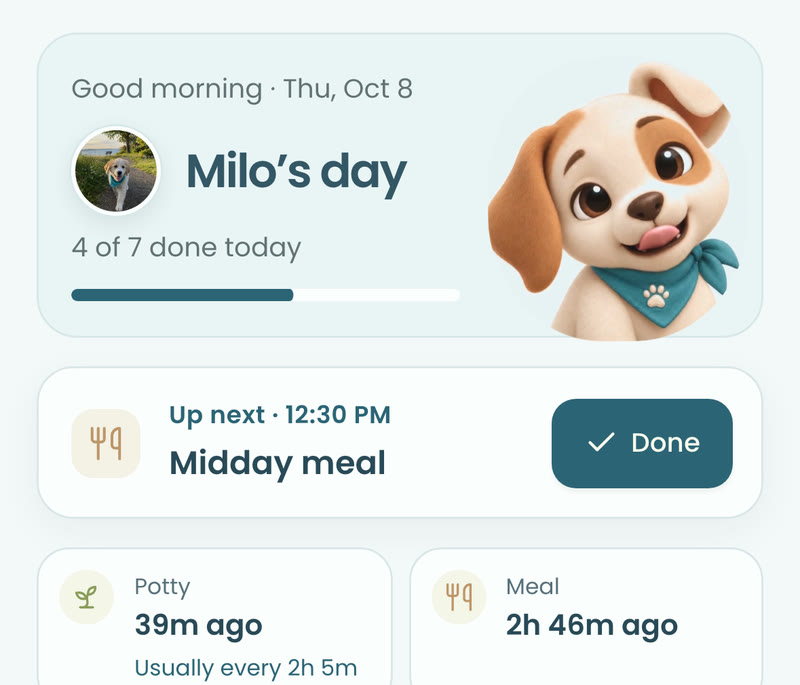
- Use Add to the routine on Today for your puppy’s planned meals, outings, and rest.
- Invite your partner or sitter through Family and agree who covers your meeting blocks.
- Check Moments when you take over; completed care already has a time and caregiver.
7-day free trial for eligible new subscribers. Subscription required.
A meeting is not a care handoff
You are in a call, your partner is in another, and each assumes the other has the puppy. A workable routine needs both a visible day and an explicit agreement about who has care.
This tension appears in a 2024 work-from-home discussion and an older forum question about a rest routine. The Pet Parent gives the household a shared view of care; your agreement supplies the coverage.
Put the puppy’s routine on Today
Open Today → Add to the routine. Choose the care type, planned time, and a clear title. Use A helpful note for a concise instruction the household will need at that point in the day.
Edit the starter routine to fit your puppy and professional guidance. Another owner’s schedule cannot tell you what your own puppy can manage. Add the arrangements you can actually carry out around work.
As care happens, mark the routine item done or use Quick log. The completion shows the caregiver and actual time, making the difference between planned and completed care visible.
Bring the people helping into the same day
Invite your partner, walker, or sitter through Family → Invite someone. They join the puppy’s space with their own account. You can review the routine together and see the same care entries.
Before a protected work block, check the latest care and agree who is taking over. “Can you cover this call?” needs an answer. The shared routine is a common reference, not an automatic assignment or proof that someone is available.
If nobody can cover a period, arrange help or adjust the commitment. For an outside sitter, follow the sitter setup guide before you need them.
Let one-tap updates carry the handoff
After care, the caregiver taps the corresponding Quick log action. The app fills in the time and caregiver. They can use Edit details when something needs explaining.
When your meeting finishes, open Moments. Check the sequence without asking someone to reconstruct the last two hours. Useful observations stay attached to their events.
Logging works offline, but other devices see updates after syncing. If a caregiver has been disconnected, confirm important details directly. The current app has no scheduled push reminders; keep work alerts in your calendar while using The Pet Parent for the care routine and history.
Review the difficult transition with the history in front of you
Was a planned outing left unconfirmed? Did both people assume a handoff happened? Use the entries to agree on one practical change to tomorrow’s routine.
Plan suitable rest and gradual practice being comfortable apart. Blue Cross’s guidance describes building that practice gradually. A nap item is not a promise that a puppy will settle through a presentation, and the app does not treat separation distress.
Get appropriate professional support when your puppy struggles. Keep the routine and observations together as your household puts that advice into practice.