A sitter handoff that stays with your puppy.
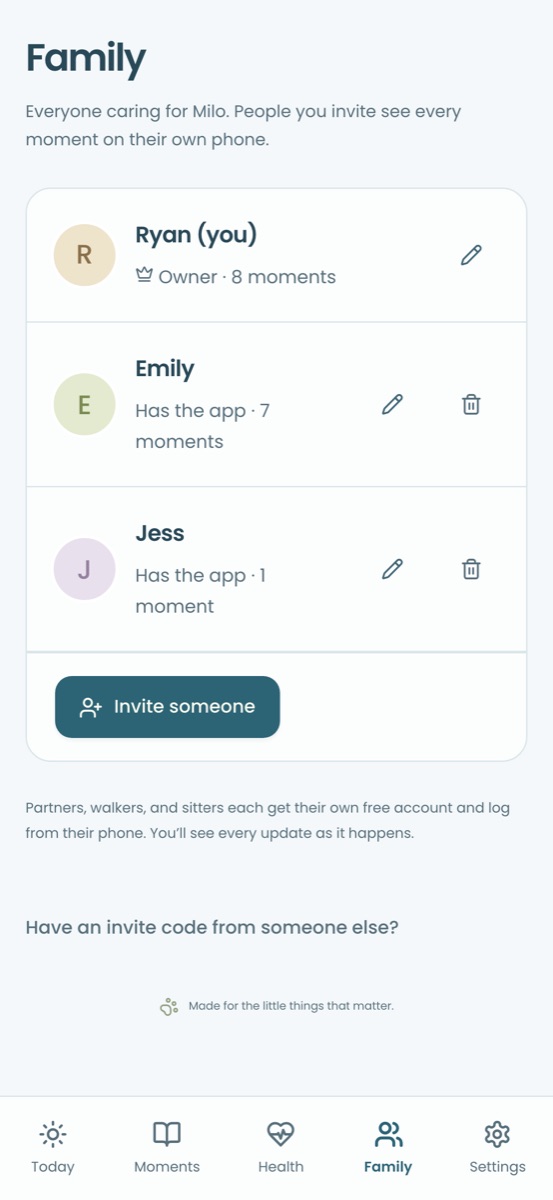
- Open Family and choose Invite someone.
- Your sitter signs in with their own account and joins using the family invite code.
- They follow the daily routine and log care; you see their updates in Moments.
7-day free trial for eligible new subscribers. Subscription required.
Give the sitter one place to check everyday care
Dinner instructions in one message, the last walk in another, a photo somewhere else: a sitter can end up piecing the day together. A discussion about booking friction describes that problem of finding details across messages.
The Pet Parent’s routine and Moments timeline give you a common reference. The sitter can see what is planned, what has been logged, and who did it. You can check their updates without asking for a recap of every completed task.
Invite them before the stay starts
Open Family → Invite someone and share the code privately. The sitter installs The Pet Parent, signs in with their own account, chooses I have a family invite code, and enters it. Codes work for seven days.
Check the setup together. Ask them to open Today and Moments for the correct puppy. They should recognize the routine and find the latest care entries without using your login.
Invited people can see the shared journal and photos and add their own moments. Each person can edit or delete the moments they logged. The owner can remove a member when access is no longer needed.
Put instructions where the sitter will use them
Edit meals, outings, and rest in Today → Daily routine. Give items clear names and use their helpful notes for the instruction needed at that moment. Add a Note in Moments for longer context, such as where supplies are kept or an agreed walking arrangement.
AAHA’s preparation guidance highlights routines, individual needs, and emergency information. Review those needs with the sitter and keep professional instructions accurate. The app makes information available; a conversation confirms they understand it.
Keep owner, backup, and clinic contact arrangements clear. Share door codes privately. Confirm clinic authorization or payment requirements directly with the clinic.
Let care entries carry the everyday updates
After a meal, outing, or activity, the sitter taps its Quick log action. Time and caregiver are filled in automatically. They can use Edit details for an observation or attach a photo to a moment while signed in.
Those entries appear in the shared Moments timeline when synced. A routine update does not have to become a second account of every meal and walk.
Care can be logged offline, but other devices see the entries after syncing. Before an important handoff, confirm that recent updates are available. Agree directly about anything the next caregiver must know if a connection is unavailable.
Come home knowing what happened most recently
Open Moments to review the latest meal, walk, and potty entries before taking over. Ask about anything unusual and what still needs doing. Relevant observations stay with the care entries they describe.
Urgent concerns require a call to the appropriate person or clinic. The shared journal is not an emergency alert, and your veterinarian is not monitoring it.
For feeding details, see how to check who fed the dog. To prepare a concern for the clinic, use the photo and vet-report workflow.